> ## Documentation Index
> Fetch the complete documentation index at: https://cobo.com/payments/llms.txt
> Use this file to discover all available pages before exploring further.
# 交易对手方
在使用充值模式进行收款时,您可以使用**交易对手方**功能来管理付款方信息。
您在录入交易对手方(可以是个人或者机构)及其钱包地址后,充值交易中将展示来源地址对应的交易对手方名称,帮助您及时了解资金来源方身份。
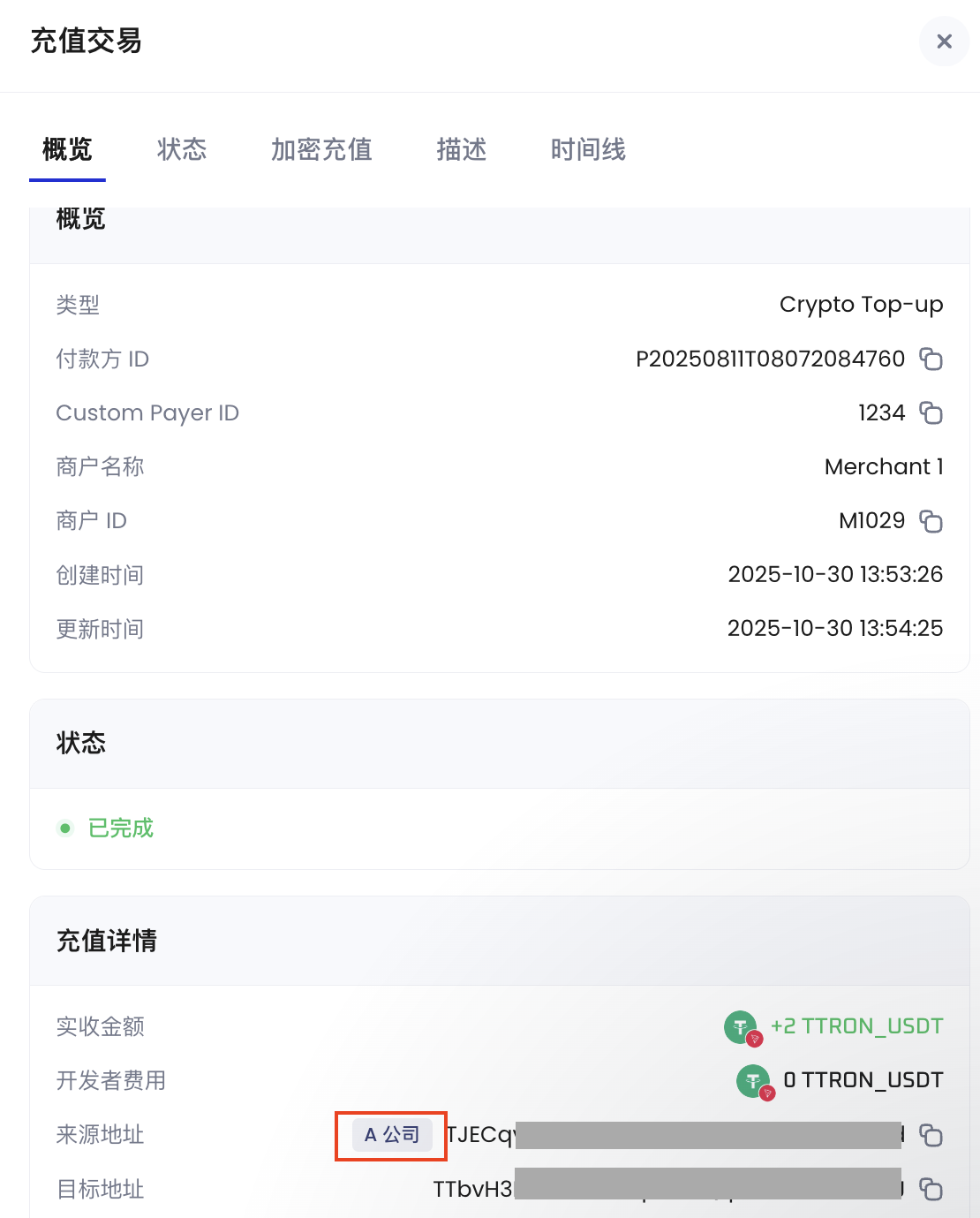 目前,交易对手方功能仅适用于充值模式。订单模式和订阅模式暂时不支持。
## 创建交易对手方
您可以在 Payments App 中创建交易对手方,并为其添加钱包地址。
### 具体步骤
1. 登录 Cobo Portal [开发环境](https://portal.dev.cobo.com/login) 或[生产环境](https://portal.cobo.com/login)。
2. 在左侧导航栏点击 **Apps**,然后点击 **Payments** 卡片启动应用。
3. 在应用的左侧导航栏点击**收款** > **交易对手方**。
4. 点击右上角的**添加交易对手方**按钮。
5. 在弹出的表单中填写以下信息:
目前,交易对手方功能仅适用于充值模式。订单模式和订阅模式暂时不支持。
## 创建交易对手方
您可以在 Payments App 中创建交易对手方,并为其添加钱包地址。
### 具体步骤
1. 登录 Cobo Portal [开发环境](https://portal.dev.cobo.com/login) 或[生产环境](https://portal.cobo.com/login)。
2. 在左侧导航栏点击 **Apps**,然后点击 **Payments** 卡片启动应用。
3. 在应用的左侧导航栏点击**收款** > **交易对手方**。
4. 点击右上角的**添加交易对手方**按钮。
5. 在弹出的表单中填写以下信息:
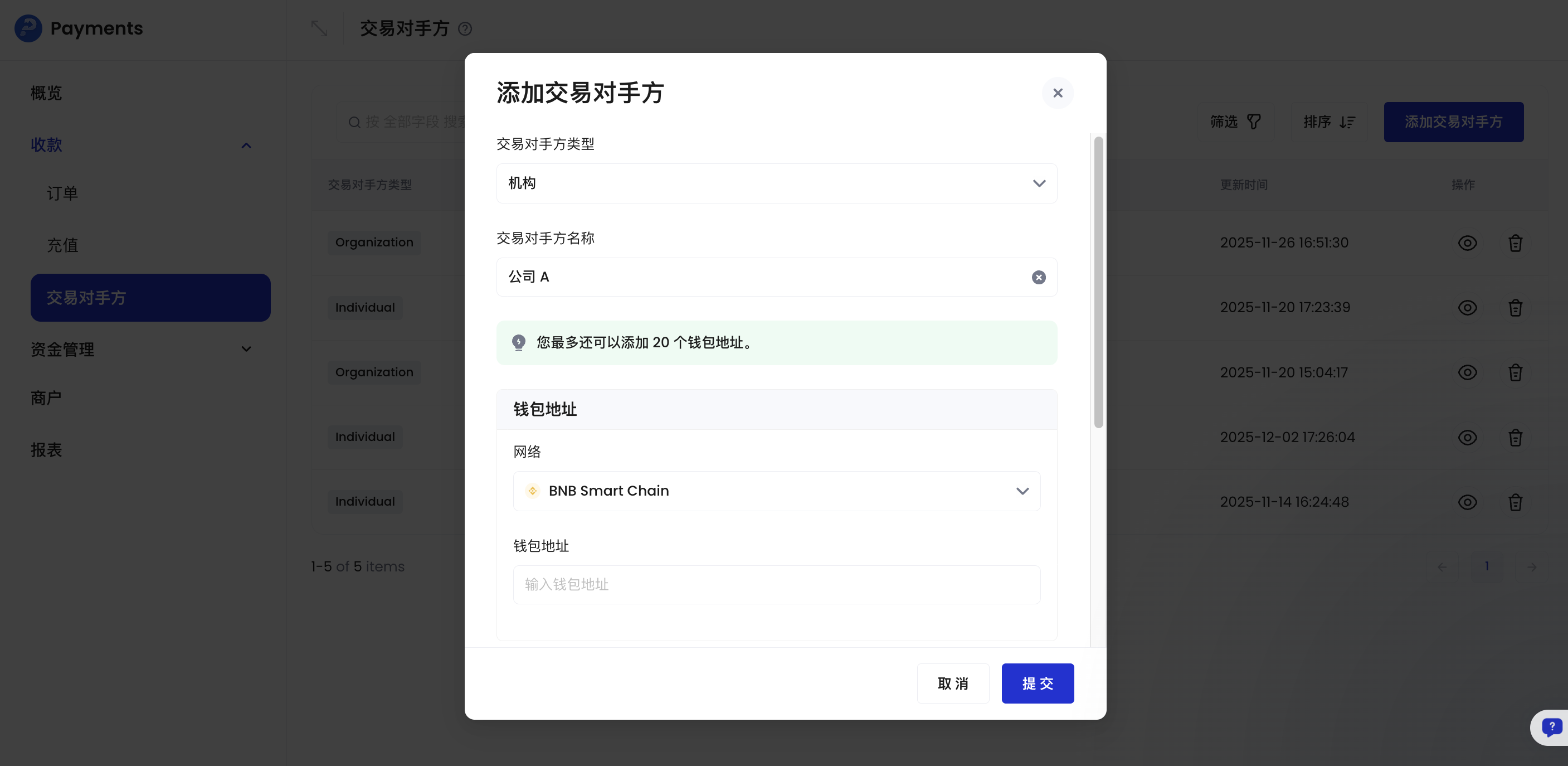 * **交易对手方类型**:选择个人或机构
* **交易对手方名称**:输入用于识别此交易对手方的名称
* **钱包地址**: 输入该交易对手方的钱包地址,支持输入多个。
您可以为单个交易对手方添加多个钱包地址,包括同一条区块链上的多个地址。
* **网络**:选择区块链网络
* **钱包地址**:输入钱包地址
* **国家/地区**(可选):选择交易对手方所在国家/地区
* **邮箱**(可选):输入交易对手方的邮箱地址
* **联系地址**(可选):输入交易对手方的联系地址
6. 点击**提交**,并完成身份验证。
* **交易对手方类型**:选择个人或机构
* **交易对手方名称**:输入用于识别此交易对手方的名称
* **钱包地址**: 输入该交易对手方的钱包地址,支持输入多个。
您可以为单个交易对手方添加多个钱包地址,包括同一条区块链上的多个地址。
* **网络**:选择区块链网络
* **钱包地址**:输入钱包地址
* **国家/地区**(可选):选择交易对手方所在国家/地区
* **邮箱**(可选):输入交易对手方的邮箱地址
* **联系地址**(可选):输入交易对手方的联系地址
6. 点击**提交**,并完成身份验证。