

GoogleBook and the New AI OS: When Intent Becomes the Interface and Security Gets Rewritten
May 15, 2026
Google’s newly announced GoogleBook points to an attractive future: move the cursor, and the system understands the context; ask for something, and the interface forms around the task; move between phone and laptop, and work keeps going across apps and devices.
That is the promise. It is also the problem.
The more active AI becomes, the larger the risk surface gets. A hover, a selection, or a vague instruction may one day be read as permission to act. At that point, the old security model — passwords, pop-ups, permission toggles — starts to look too thin. The AI agent era will need a different kind of boundary: one that can audit intent in real time, defend against visual deception, and apply financial-grade rules before actions are executed.
A mouse gave people a direct way to control computers. The touchscreen moved computing from the desk to the fingertip. AI is now pushing toward a third question in the history of human-computer interaction: can the system understand the intent behind an action?
That is the right lens for looking at GoogleBook, the new laptop category Google announced on Tuesday. The hardware matters less than it first appears. GoogleBook does not look like a normal consumer laptop line. It looks more like a prototype for AI-native computing.
There is a useful parallel here: Amazon used Kindle as a way into the e-book market. The device was the entry point. What really changed was content distribution and the relationship with readers. GoogleBook may play a similar role. The laptop is a vehicle for AI distribution. What Google really wants to reshape is the entry point to personal computing.
Most of the industry is still packaging AI as a separate app: a chat window, a sidebar, a copilot panel. Google is taking a lower route. Gemini is being pushed down into the operating system itself — into the cursor, the file directory, desktop widgets, Android apps, and cross-device workflows.
That marks a real shift. The computer is no longer just a set of tools waiting for instructions. It is starting to become a context-aware action system, one that can read what the user is doing and infer what may come next.
From fixed containers to flowing intent
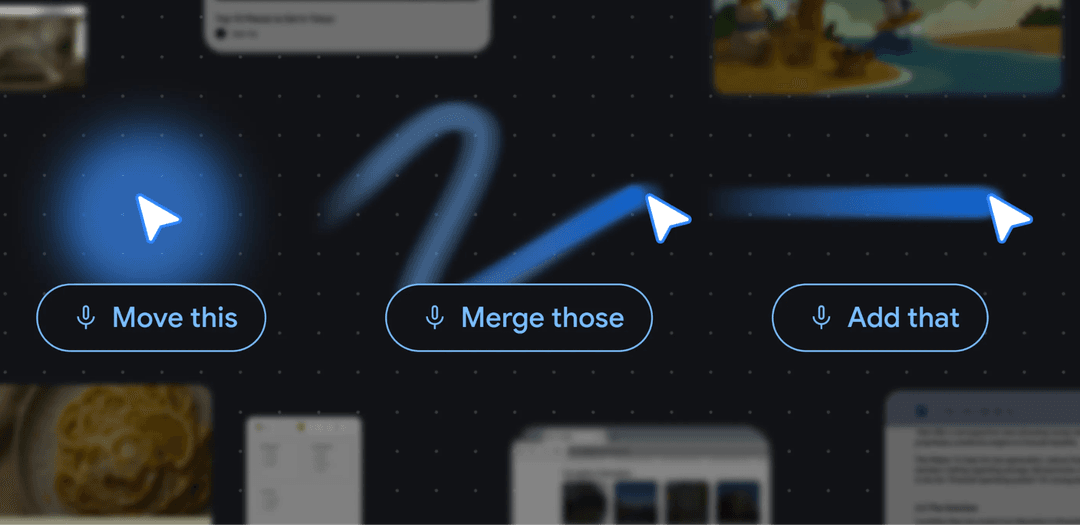 This deeper change shows up in three parts of GoogleBook.
The first is the cursor.
In a traditional operating system, the cursor is just a map between physical movement and screen coordinates. The system knows where the user clicked. It does not really know what the user meant.
Magic Pointer tries to change that. It turns the cursor from a pointing tool into a context-aware entry point.
If the cursor rests on a date in an email, the system can infer that scheduling may be useful. If the user selects two images — say, a room and a sofa — Gemini may understand that the user wants to compare them, place one inside the other, or generate a visual preview.
This removes one of the biggest frictions in AI today. A user sees something, then has to describe it to the model. Magic Pointer tries to cut out that middle step. The system sees the object at the same moment the user does, then suggests what could happen next.
The second change is the interface.
Software has usually come in fixed shapes. A trip plan may live across email, maps, calendar, documents, browser tabs, and booking apps. The user has to pull the pieces together. The interface exists before the task.
GoogleBook’s “Create my widget” points in the other direction. The task comes first. The interface is then assembled around it.
A user describes a need, and the system can generate a temporary desktop widget or task panel by pulling from different data sources. When the job is done, the panel can disappear.
This is what OS-level vibe coding looks like. Apps still matter, but their role changes. They become pools of data and capability that the system can call on. The user does not always need to open the right app first. The UI forms around the job, then gets out of the way.
The third change is cross-device context.
ChromeOS has long had an awkward gap. It is Google’s desktop operating system, yet it has never fully absorbed the Android world. GoogleBook appears to treat that gap as a strategic problem to solve. Nearby Android phones can become part of the laptop workflow, allowing some mobile apps and content to surface on the computer without forcing the user to pick up the phone.
The deeper point is personal context.
A large share of daily life now sits on the phone: photos, chats, payments, maps, travel plans, authentication, learning apps, and all the small utilities people rely on without thinking. A laptop that cannot see the phone sees only part of the user’s world. It also sees only part of the task.
GoogleBook is trying to make Android a native capability layer for the PC. Android apps, files, photos, messages, maps, payments, and phone state can all feed into the laptop workflow. Gemini then understands more than the windows on the desktop. It can start to understand the task as it moves across devices.
This gets close to the system-level assistant Siri once promised and never fully delivered. Google’s path runs through Android, Chrome, Gmail, Maps, Search, YouTube, and now a laptop designed around Gemini.
Put together, GoogleBook connects three entry points: the cursor captures attention, generative UI shapes the interface around intent, and Android supplies cross-device context. The operating system starts to move away from a bundle of fixed software. It becomes an action layer that forms around what the user is trying to do.
These moves also reveal Google’s deeper business logic. In standalone races like chatbots and AI coding tools, Google may not secure an absolute lead. With GoogleBook, it is trying a different route: bypass the crowded app layer and move directly into the basic interface infrastructure. If this chain works, Google has a real chance to become the strongest player in end-to-end AI distribution.
The interface shift: AI moves into daily gestures
Step outside the product frame, and GoogleBook starts to look less like a laptop announcement and more like a shift in Google’s AI distribution strategy. Most of the AI race still revolves around model capability, parameter size, and reasoning performance. Google is looking one layer lower: distribution.
Standalone AI apps matter, but they come with a basic friction. The user has to remember the tool exists, open it, and restate the task. That sounds small, but in practice it is enough for many quick needs to disappear before they ever reach the model. The real high-frequency workflow still happens inside the system: reading email, browsing a webpage, selecting an image, dragging a file, switching context, and moving from phone to laptop.
GoogleBook’s bet is simple: put Gemini inside those actions. The cursor points at an object, and the system starts to read the context. The interface forms around the job. Apps, files, and states from the phone enter the laptop workflow. AI no longer waits inside a chat window for the user to call it. It shows up where the work has already started.
Once users get used to “pointing as prompting,” the old app-first path begins to feel heavy. The old habit was to have a task, then find the app that can handle it. The new habit is cleaner: point to the object, state the goal, and let the system build the path. That is much closer to how AI-era computing is likely to feel: less switching, less explaining, more action from context.
This is the strategic signal inside GoogleBook. Google is trying to use a change in basic interaction to train an intent-first habit. AI fades into the gestures of computing: clicking, selecting, dragging, reading, and moving between devices. It becomes the system’s default understanding layer.
Very few companies can fight at this level. Google has Android, Search, Chrome, Gmail, Maps, YouTube, and Gemini. With GoogleBook, it is trying to plug those assets into a new entry point for personal computing. Apple has a different route: iPhone, Mac, iPad, Apple Watch, AirPods, iCloud, the App Store, and tight control over the hardware-software stack. That gives Apple a natural path to turn AI into a quiet, persistent system capability.
GoogleBook suggests that the main entry point for AI may not belong only to chatboxes like ChatGPT or Claude. It may belong to the interfaces closest to daily behavior: the cursor, the desktop, the phone, and the operating system itself.
Governance and power: the rules an AI OS will need
The more active the system becomes, the easier it is for risk to scale.
Traditional PC security was built around defense: block malware, protect accounts, stop bad permissions, isolate dangerous code. An AI-native system changes the shape of the problem. The object of security expands from the device and its permissions to the full execution path: what the user looked at, what the agent inferred, what it decided to call, and what happened after that.
That points to three security layers an AI OS will likely need.
1. Intent audit: security has to follow attention
If Magic Pointer turns the cursor into an attention sensor, the security layer needs the same sense of movement. It cannot apply the same level of scrutiny everywhere.
When a user is reading a normal webpage, the system can stay quiet. When the cursor moves near a payment button, a sensitive document, an authorization screen, or a high-risk action, the system should tighten up. Before an agent calls an external API, the OS should check more than local permissions. It should verify the service being called, the state of that service, and whether the model or tool in the loop is still the one the system believes it is using.
Security becomes situational. It moves with the user’s attention.
2. Seeing through the screen: visual deception and Shadow APIs
Multimodal AI lets the system see the screen. That also makes the screen a new attack surface.
Once Magic Pointer turns visual objects into actionable objects, attackers can work through the visual layer. A webpage can make a dangerous button look harmless. A document can hide hostile instructions. A normal-looking interface can push an agent toward the wrong action.
So the safety layer cannot just trust what the agent thinks it sees. It has to compare the pixels with the underlying metadata, page structure, object identity, and permissions. Is this really the button the user meant to click? Does it exist in the system’s logic, or is it just a visual trick?
There is another risk behind the interface. The models, plugins, and APIs an agent calls are often black boxes to the user. If a service is downgraded, a model is swapped, or an undeclared Shadow API appears in the path, the user’s intent at the front end can break apart from what is actually executed at the back end.
This is where Cobo’s Shadow API governance work fits into the picture. In an agent economy, safety is about more than stopping bad calls. The system also has to verify who is executing behind the call, what capability is being used, and whether the action still matches the user’s original intent.
3. From intent to authorization: financial-grade rules
The hardest boundary appears when fuzzy intent becomes real authorization.
A hover, a selection, or a vague instruction can all be interpreted by the model as the next step. If the action is sorting images, the risk is small. If it touches payments, transfers, file edits, permission changes, or external contract execution, semantic judgment is not enough.
AI can identify what the user may want. It should not decide alone whether execution is allowed.
For high-risk actions, an AI OS needs something closer to financial controls: budgets, limits, approved objects, time windows, approvals, multisig, rollback paths, and audit trails. These should be hard rules before execution, rather than warnings after the fact.
That is the point of rule frameworks like Cobo Pact. They translate user intent into conditions that can be verified, limited, and traced. The agent can propose the action. The rule system decides whether it is authorized.
This may become the most important safety friction in the AI OS era. When the system gets close to real assets, core permissions, or irreversible actions, it has to slow down on purpose.
A good AI operating system will try to remove as much friction from work as possible. A trustworthy one has to know exactly where friction must come back.
That may be the real test as AI OS moves toward maturity. The system needs to understand the user’s next intent faster, but speed alone is not enough. It also has to provide enough certainty to make sure every action still tracks back to what the user actually meant.
View more

Cold Wallet vs Hot Wallet: What Crypto Exchanges and Users Need to Know in 2025
June 17, 2025
Stablecoin Payments 101 for PSPs: How to Integrate Digital Dollars Without Rebuilding Your Stack
December 11, 2025
Cobo vs. Fireblocks: Choosing the Right Digital Asset Custody Provider for Your Business
June 17, 2025