

Disclaimer: This article contains AI translations and should only be used as reference. Contact Cobo’s support team through [email protected] if you have any questions.
Use cases
- After end users complete a cryptocurrency order payment in the checkout, they may need a refund for various reasons and actively apply for a refund in your App/platform. Your customer service team reviews the application in your internal system, approving or rejecting it.
- If the user’s refund application is approved, you use the API to obtain Cobo’s “refund address collection page URL” and send it to end users via email or other methods (Cobo does not have end user email addresses, so you need to send the URL to users yourself). After end users fill in the address, Cobo completes the “automatic refund transfer” process.
- You can monitor Cobo callbacks/status queries through Webhooks to track “address submitted/refund initiated/completed”. Confirm the refund is complete and synchronize the order status in your system, closing the ticket.
Process overview
The following diagram shows the complete interaction process for refund address collection: Process steps:- Step 1 (Your backend): Call the “Get refund address collection URL” API to obtain the URL
- Step 2 (Your backend): Send the URL to users via email/SMS
- Step 3 (Cobo frontend): Users fill in and submit the refund receiving address on the page
- Step 4 (Cobo backend): Cobo automatically uses the address to initiate a refund task and notifies you via Webhook of statuses such as “address submitted/refund initiated/refund completed”
Quick integration
Prerequisites
You have completed all the steps mentioned in Preparation, including:- Prepare API Key and API Secret
- Configure Webhook receiving address and signature verification
- Have integrated order mode payment collection service with payment data, and account balance is not zero
- Notification channel preparation
- Confirm strong notification channels for sending URLs to end users (such as email/SMS/IM), and prepare email templates and sender domain whitelists in advance (for example, only trigger refund notifications for user emails with purchase records)
- Risk control and compliance
- Set withdrawal risk control rules in Cobo Portal. Refunds are also considered withdrawals. When rules are triggered (for example, exceeding amount thresholds), administrator approval is required before executing transfer transactions to avoid large-amount risks
End-to-end process
1. User submits refund request (Your system)
- Users initiate a refund request on your page, filling in order number/reason, etc.
- Customer service reviews in your backend: approve or reject.
- If rejected: notify the user in your system and end the process.
2. Get refund address collection URL (Your backend)
Call Create refund link: API endpoint:POST https://api.cobo.com/v2/payments/links/refunds
Request parameters:
transaction_id: Original user payment transaction ID. Used to associate the from address in the original order/deposit transaction (default refund to original address) and token ID (refund original token & chain)amount: Refund amount. Generally the user’s original order actual payment amountrefund_source: Source of refund amount, i.e., choose to transfer from PSP Balance or specify a Merchant Balance. If Merchant is selected, you need to specify Merchant IDmerchant_id: Optional, required whenrefund_sourceis set to Merchantfee_amount: Optional, refund processing fee. Invalid if source is PSP Balance
url: Refund address collection page URL, one-time link that can only be submitted oncetoken: Unique identifier for the refund request
3. Send URL to user (Your backend)
- Use your own scripts/services to send the URL to users via email/SMS. You need to send it yourself, as Cobo does not have end user email addresses.
- Key user-side reminders (recommended to include in both email and page, Cobo has already handled page reminders):
- This page is for the original payer only. Do not forward. If you are not the original payer, do not submit.
- Only supports specified chain/assets. Please verify the network and address, and fill in Memo/Tag if necessary. Blockchain transfers are irreversible.
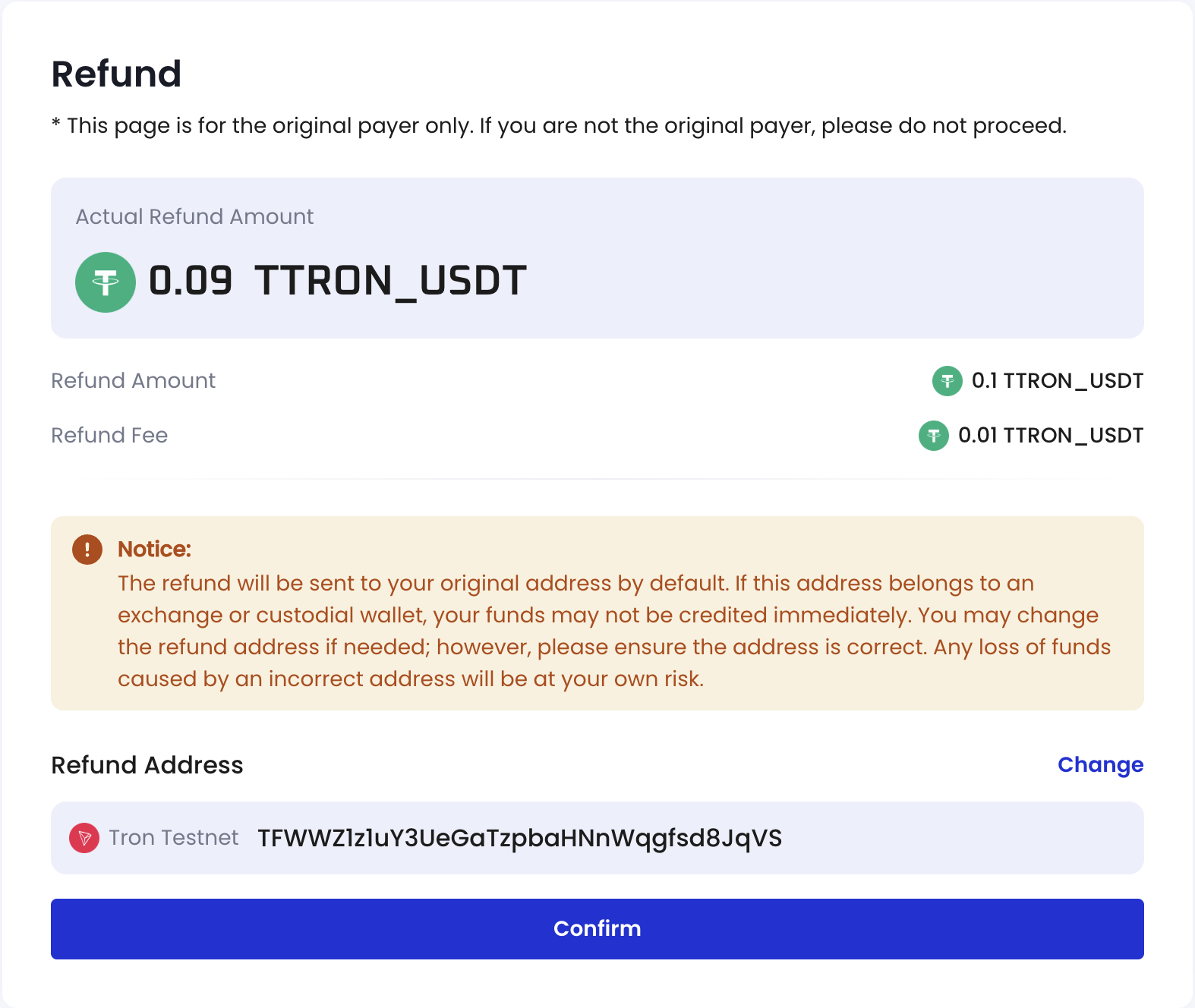
- If the default display is an exchange/custodial address, it is recommended to change it to a personal controllable address to ensure timely receipt.
- We will never ask for your private key/mnemonic/verification code. Beware of scams.
4. User submits refund address (Cobo frontend page)
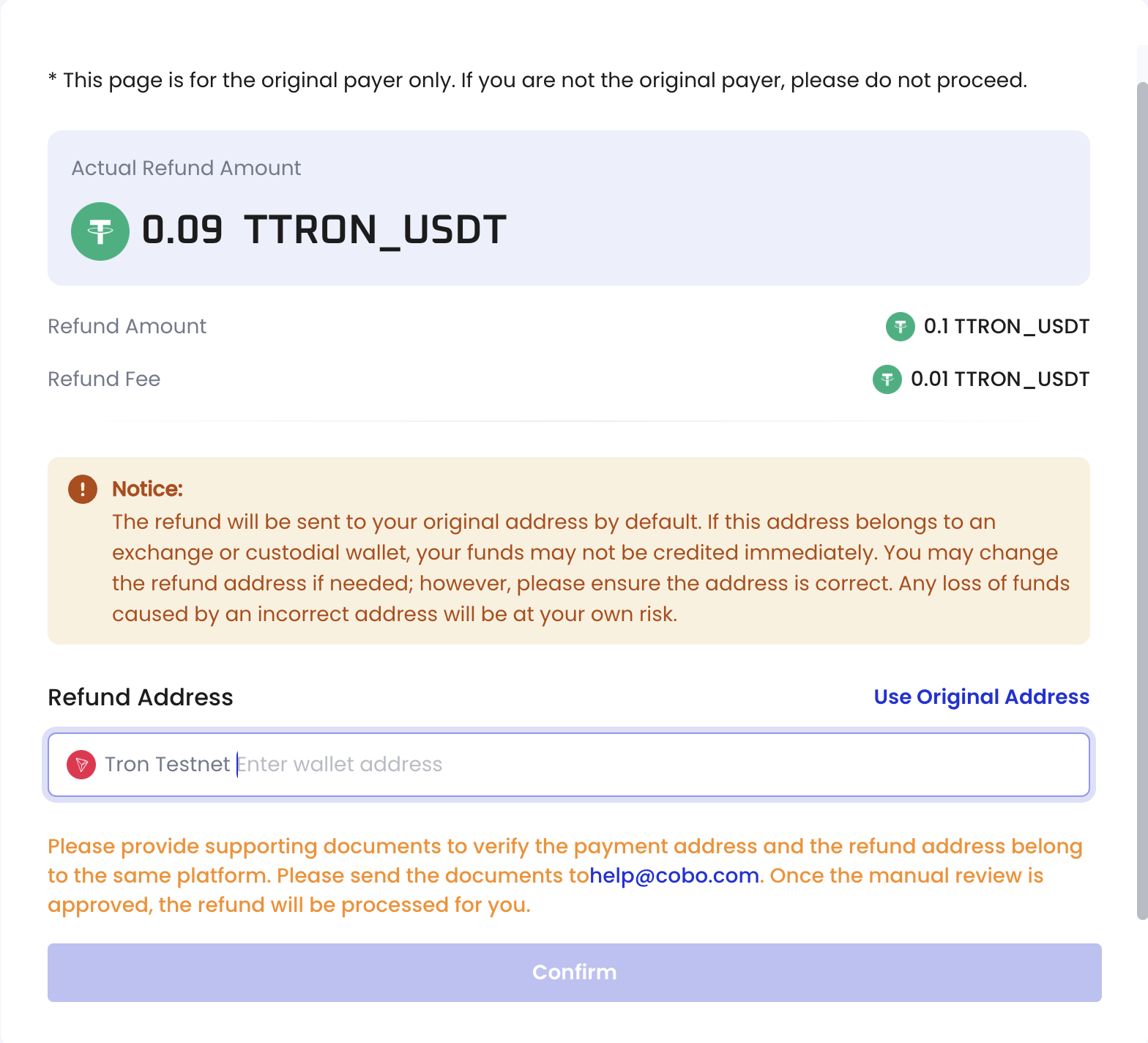
- Users open the URL and fill in the receiving chain/address according to the page instructions. After submission, address verification and confirmation are completed.
- After Cobo receives it, the status changes to “address submitted successfully” and includes a notification with the new address information.
- The pages users see are shown below:
5. Automatically initiate refund and notification (Cobo backend)
- Cobo automatically initiates refund tasks (on-chain transactions) using the address information submitted by the user. You can track the progress via Webhook notifications. The relevant event is
payment.refund.status.updated, which includes the following status changes:pending: The refund request has been submitted, and the refund order is successfully created.completed: The refund process is complete.partially.completed: Some refund transactions have been completed, while others have failed.failed: The refund process has failed.
- You can also actively pull the status through the “Query refund” API by
refund_id.
Query and retry
Query refund status
You can query refund status through the following method: API endpoint:GET https://api.cobo.com/v2/payments/refunds/{refund_id}
Regenerate URL
If the link has been used, call the same API to generate a new URL and send it to the user again.The refund address collection URL is a one-time link that becomes invalid after the user submits the address. If you need to collect the address again, please call the API to generate a new URL.
Common errors and handling
Address risk and compliance requirements
- Cobo KYT rejection case: If the original transaction was rejected due to Cobo KYT, users need to provide additional materials according to page prompts when changing addresses (proving that the old and new addresses belong to the same exchange platform). If not provided, the process cannot continue and requires Cobo customer service intervention.
- Your KYT rule rejection: If the original transaction was rejected due to your KYT rules, or if the transaction was not rejected, changing addresses usually does not require additional materials.
If you encounter other issues, please contact Cobo’s support team through [email protected].